Sunday, August 17, 2014

Database Mirroring in SQL Server - Introduction (Part - 2)

In my previous post, I've introduced Database Mirroring with its requirements and operating modes. As said, in this post I'll discuss about the importance and impact of configuring Witness in Mirroring.

Impact of Witness in Database Mirroring


The main job of Witness is monitoring the partners that are participating in Mirroring session. It checks frequently whether both Principal and Mirror are in working state. A single witness can be used to monitor more than one mirroring session.

In High Safety Mode


If a Witness is configured in a Mirroring Session then Quorum is needed. Quorum is a relationship that exists when two or more instances in a Database Mirroring Session are connected to each other. If any instance is not connected then that particular instance loses quorum. If no instance is connected then the whole session loses quorum hence the databases become unavailable.

There are three types of Quorum,

Full Quorum - Consists of both the partners and witness.

Witness to Partner Quorum - Consists of any one partner and Witness.

Partner to Partner Quorum - Consists of only partners.

These quorums are supported in High Safety Mode. When there is a Full Quorum, all the instances act according to their roles until a manual failover is performed.

Suppose Principal is down and loses connection with Witness and Mirror and if Witness and Mirror remain connected then they both form a quorum and an automatic failover occurs. Now Mirror becomes Principal and starts servicing the clients.

Suppose Witness becomes unavailable and steps out of Quorum, the partners remain connected to each other, this is called Partner to Partner Quorum. In this case, a manual failover is possible.

If all the server instances become disconnected from each other, the session is said to have lost quorum. As server instances reconnect to each other, they regain quorum with each other.
  • If the principal server reconnects with either of the other server instances, the database becomes available.
  • If the principal server remains disconnected, but the mirror and witness reconnect to each other, automatic failover cannot occur because data loss might occur. Therefore, the database remains unavailable, until the principal server rejoins the session.
  • When all three server instances have reconnected, full quorum is regained, and the session resumes its regular operation.
To have a detailed explanation of how a Quorum affects database availability, follow the official documentation of Microsoft,


In High Performance Mode


While using High Performance Mode, it is recommended to set the Witness to OFF because a witness can be set in this mode but it serves no purpose. If a witness is configured in this mode, it requires a quorum which should consist of at least two instances connected to each other.

If the witness is disconnected from the quorum when any of the partners goes down then the database becomes unavailable. When mirror goes down, the principal should be connected to witness otherwise the principal's database goes offline until mirror or witness rejoins the session. As said earlier, in this mode only forced failover is possible. When a witness is configured, if principal is down then it requires mirror and witness to be connected to each other to perform a forced failover.

For a detailed explanation of Database Mirroring Operating Modes, read Microsoft's documentation,

http://msdn.microsoft.com/en-us/library/dd207006.aspx

How a Witness performs Automatic Failover


When the partners get disconnected from each other, witness ensures whether one of them is available for the clients. In High Safety Mode, if a Mirror loses the connection with Principal after getting synchronized with it completely but still remains connected with Witness then no failover occurs and Principal keeps on serving its database to clients. In this case, the Principal keeps on accumulating log records that have to be sent to mirror once it joins mirroring session.

If Principal gets disconnected from Witness then Mirror server knows that principal is down and immediately initiates an automatic failover. If mirror is disconnected from principal and witness then no failover occurs and the state of Principal is not considered in this case.

To know more about a Witness, follow the following link,

http://msdn.microsoft.com/en-us/library/ms175191.aspx

Friday, August 15, 2014

Database Mirroring in SQL Server - Introduction (Part - 1)

The most important feature for any application is Availability. An end user gets satisfied completely when the application is available at any time. This availability is achieved from the database itself. SQL Server offers many such availability mechanisms. One of such mechanisms is Database Mirroring. I'm going to produce a series of articles on Database Mirroring.

Database Mirroring was first introduced in SQL Server 2005 and it is available in Enterprise, Developer, Business Intelligence and Standard Editions. The main concept of Database Mirroring is maintaining a standby copy for your database and keeping both the databases in a sync so that the copy database serves the clients when the main database faces any kind of problem.

There are three instances participated in Database Mirroring,

Principal - This is where the main copy of database resides.

Mirror - This is where the standby copy of database resides.

Witness - This is an optional instance which initiates automatic failover from Principal to Mirror and is set only in High Safety Operating Mode which I'll discuss later in this post.

When database mirroring is set up, Principal sends the transaction log records to the Mirror over network and Mirrors gets synchronized with Principal. When Principal becomes unavailable due to any problem, Mirror becomes the new Principal and serves the clients. This process is called Failover. When a Witness is configured, it initiates this failover automatically.

In SQL Server, Database Mirroring allows only one mirror for one principal. To have more than one mirror, another availability solution namely AlwaysOn High Availability should be used which supports up to four replicas for one principal. In SQL Server 2012 Books Online it is specified that Database Mirroring will be deprecated. This means in the next release (SQL Server 2014), it is supported but will not be available in a later release of SQL Server. So, Microsoft recommends to use AlwaysOn High Availability.

Requirements for Database Mirroring


Before setting up database mirroring, the following conditions should be satisfied:

  • The Principal and Mirror (collectively called Partners) should be of same version and edition of SQL Server.
  • The Witness should be of same version and can be of any edition. Even an SQL Express can serve as Witness as it is just a monitoring one.
  • Principal, Mirror and Witness should be configured on three different instances.
  • The partner databases should be in Full Recovery Model.
  • There should be enough disk space on Mirror server for Mirror database.
  • The latest backup of Principal database should be restored on Mirror Server WITH NO RECOVERY because this allows inserting transaction log records into the database.
  • The log backup of Principal database should be taken and restored to the newly restored Mirror database WITH NO RECOVERY.
  • The Principal and Mirror databases should be with same name.

Failovers in Database Mirroring


There are three types of failovers in Mirroring,

Automatic - When Principal is down, the mirror becomes Principal automatically. This is done by Witness.

Manual - When Witness is not configured and Principal is down, Database Administrator has to make the mirror as Principal manually.

Forced - When Principal is down, the mirror is forcibly made the Principal with some data loss.

Automatic and Manual Failovers do not incur data loss and are supported in Synchronous Database Mirroring whereas Forced Failover causes data loss and is supported in Asynchronous Database Mirroring.

Operating Modes of Database Mirroring


There are two operating modes of Mirroring which impacts the application safety and performance. 

  • High Safety Mode (Synchronous Database Mirroring)
  • High Performance Mode (Asynchronous Database Mirroring)

Let us know what these modes are:

High Safety Mode (Synchronous Database Mirroring)


As said earlier, Principal sends transaction log records to the Mirror constantly. In High Safety Mode, when a transaction is made on Principal, it doesn't commit the transaction immediately. It writes the log to its disk and sends it to the mirror database. Now principal waits until mirror writes the log to its disk and sends an acknowledgement to Principal. After receiving the acknowledgement, principal commits the transaction to the client.

This mode assures full safety for data and keeps both principal and mirror databases in a synchronized state but increases transaction time. This mode requires an optional instance configured, called Witness. When witness is configured, it performs automatic failover from principal to mirror in case of any failure in principal. Even manual failure can be done when witness is present. If a witness is not configured then the database administrator has to perform manual failover in case of any failure in principal.

If Witness is not configured and Principal is down then the Mirror is suspended. In such cases, a Forced Failover can be done to the Mirror with some data loss.

High Performance Mode (Asynchronous Database Mirroring)


In High Performance Mode, when a transaction is made on Principal, it sends the log record to Mirror and commits it immediately without waiting for any acknowledgment from Mirror. There may exist a lag between principal and mirror in writing log records to their disks. When there are a lot of transactions made on principal over a time, it may increase traffic over the netwrok between principal and mirror.

When there is any failure in principal, a forced manual failover should be done to mirror. As said above, if there is a delay in mirror writing all the log records received from principal then failover incurs the loss of that data and brings the mirror in available state. In this mode, Witness should not be configured as there will be issues regarding quorum. 

I'll write about impact of witness in both the modes in later posts of this series.

For introduction about Database Mirroring, read the official documentation of Microsoft,

Sunday, July 20, 2014

Identity Jump in SQL Server 2012 and its resolution

Sometimes a new feature added in a product may affect an existing feature in it. One of such scenarios is Identity Jump in SQL Server 2012. This is affected because Microsoft introduced Sequences in SQL Server 2012 upon the request of so many users. I didn't know about this until one of my cousins pointed it out. Then I went on surfing about this in various blogs.

Let's have a look about this...

Create a table and insert some values in it like below,

USE AdventureWorks2012
GO
CREATE TABLE TEST_IDENTITY(ID INT PRIMARY KEY IDENTITY(1,1),NAME VARCHAR(100))
GO
INSERT TEST_IDENTITY SELECT 'A'
INSERT TEST_IDENTITY SELECT 'B'
INSERT TEST_IDENTITY SELECT 'C'

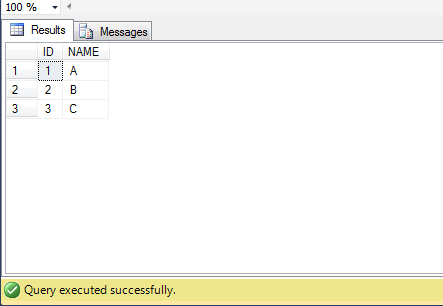
Now run a SELECT query and see the data in it.

SELECT * FROM TEST_IDENTITY


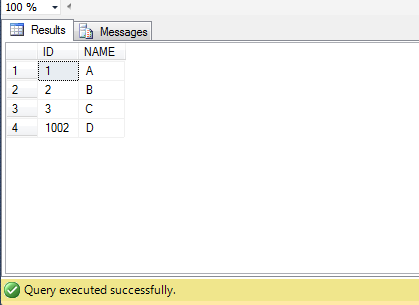
Now, go to SQL Server Configuration Manager and restart the SQL Server service. After it is restarted, insert one more row in the above table and run the SELECT query,

INSERT TEST_IDENTITY SELECT 'D'
GO
SELECT * FROM TEST_IDENTITY

You can observe there is a long jump in the value of identity... From 3 to 1002!!


Here the data type of Identity Column is INT, so it jumped in thousands. If BIGINT is used then it jumps more long. This is a known bug for Microsoft. I tried installing all the updates of SQL Server 2012 released till now, thinking it might be resolved. There was a recent release to SQL Server 2012 named SQL Server Service Pack 2 in June, 2014 but this bug wasn't resolved. Instead some blogs claimed it as a feature. It cannot be considered as a feature because in production environments this may result in a dissatisfaction as services need to be restarted often.

There are two remedies for this issue. One is using the trace flag -T272 as a start up parameter and the other is using Sequences instead of Identity Columns. We'll see how both work...

Using Trace Flag -T272


Add a trace flag as a start up parameter of SQL Server service. Go to SQL Server Configuration Manager and right click on SQL Server Service. Click on Properties and go to the tab Startup Parameters. Specify -T272 and click Add and click on Apply. Now restart the SQL Server service in order to have it effected.

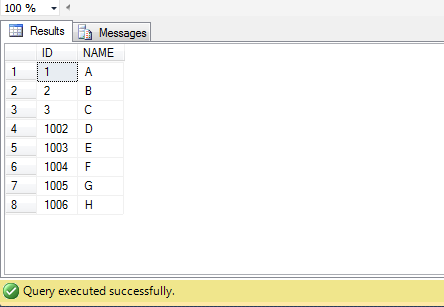
Now insert some rows in the table as below

INSERT TEST_IDENTITY SELECT 'E'
INSERT TEST_IDENTITY SELECT 'F'
INSERT TEST_IDENTITY SELECT 'G'
INSERT TEST_IDENTITY SELECT 'H'

You can see that there is no jump in Identity if you run SELECT query against it...


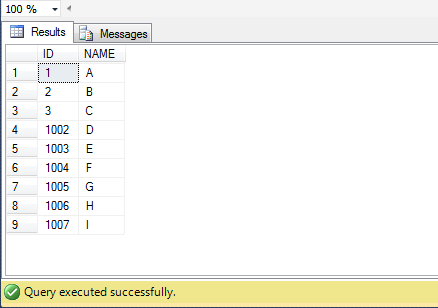
To test it again, restart the service and insert one more row and run SELECT query against it...

INSERT TEST_IDENTITY SELECT 'I'
GO
SELECT * FROM TEST_IDENTITY


If you add the trace flag to your production server, you have to bear the jumps occurred till now but no more jumps will be occurred. When new tables are created, everything will be fine.

Using Sequences


Sequences are added in 2012 version of SQL Server. It is a database level object whereas identity is not an object and sticks only to the particular table. If a sequence is created then it can be used for any table across the database. Now, let's create a sequence for a table...

CREATE SEQUENCE dbo.SEQUENCE1
AS INT
START WITH 1
INCREMENT BY 1

Now create a table that uses values generated by this sequence...

CREATE TABLE TEST_SEQUENCE(ID INT PRIMARY KEY DEFAULT NEXT VALUE FOR dbo.SEQUENCE1,NAME VARCHAR(100))

Here in the place of Identity, we used the value generated for sequence as default value. Now insert some rows into this table and see how data is inserted,

INSERT TEST_SEQUENCE(NAME) SELECT 'A'
INSERT TEST_SEQUENCE(NAME) SELECT 'B'
INSERT TEST_SEQUENCE(NAME) SELECT 'C'
INSERT TEST_SEQUENCE(NAME) SELECT 'D'
GO
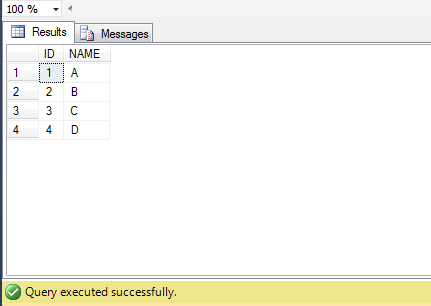
SELECT * FROM TEST_SEQUENCE


The data is inserted into the table as it gets inserted when there is an identity column. But there lies a disadvantage with Sequences. In the above table, we used the next value of the sequence as default value of the column. But you can know the next value of the sequence by running the below query...

SELECT NEXT VALUE FOR dbo.SEQUENCE1

After knowing the next value, insert one more row into the above table and see its data...

INSERT TEST_SEQUENCE(NAME) SELECT 'E'
GO
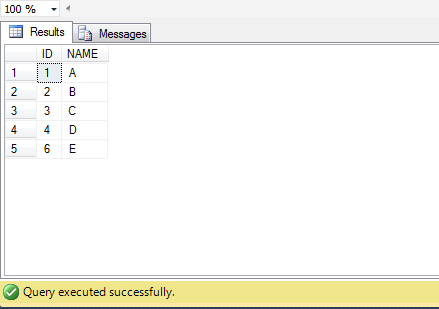
SELECT * FROM TEST_SEQUENCE


You can see that there is a value 6 is inserted because 5 had already been generated. This can't be done with Identity Columns if they work fine without any issue.

To know the basics of Sequences, read the official documentation of Microsoft.


Conclusion


According to me, in the production environments, Sequences can be used but they are not permanent substitution or remedy for Identity Jump Issue. Preferably, adding Trace Flag helps you depending on your requirement.

Hope Microsoft resolves this bug in the future!! :)